आजकल Google Gemini और ChatGPT के नए Image Models ने Photo Editing को बहुत ज्यादा आसान बना दिया है।
बस users को कुछ prompts की जरूरत होती है और फिर लोग अपने फोटो को जैसे चाहे एडिट कर सकते हैं।
इसलिए इस पोस्ट में हम आपको कुछ ऐसे ही Best ChatGPT prompts for photo editing के बारे में बताने जा रहे हैं, जो आपके बहुत काम आएंगे।
Google Gemini/ ChatGPT se Photo edit kaise karen ?
ChatGPT या Google Gemini से फोटो एडिट करने के लिए आपको सबसे पहले App के अंदर अपनी फोटो Uploadकरनी होगी।
फिर पोस्ट में दिए गए Prompts में से अपने मनपसंद Prompt को Copy करके अपनी Photo के साथ Paste कर देना है।
फिर कुछ ही Seconds में ChatGPT या Google Gemini आपकी फोटो को Prompt के According एडिट करके दे देगा।
1. Best ChatGPT Prompts For Photo editing : Remove People From Background
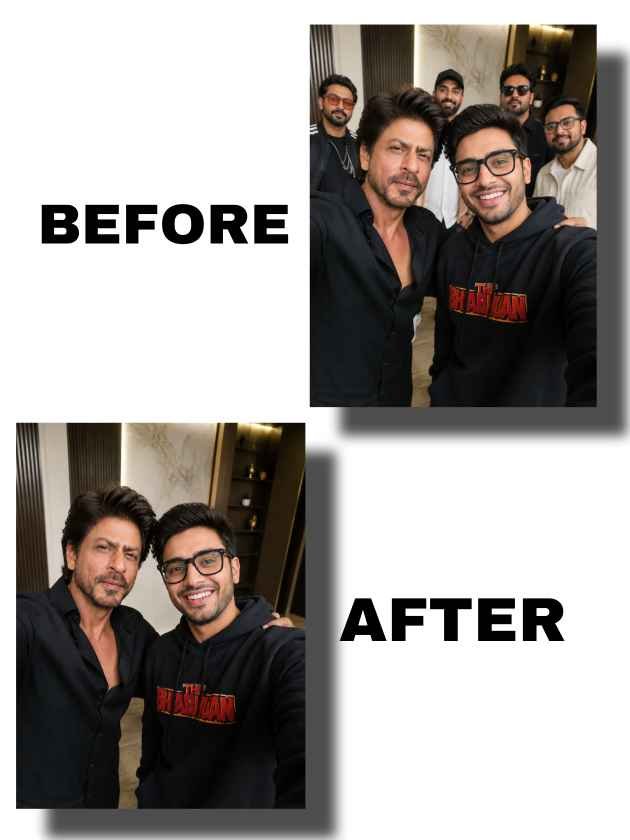
अगर आप अपनी Photo से Background में दिख रहे Unwanted लोगों को remove करना चाहते हैं। तो नीचे दिए prompt का Use कर सकते हैं।
Prompt – remove all people, crowds, and figures from the background of this photo while keeping the main subject exactly the same. Preserve the person’s identity, face, pose, expression, hair, clothing, and position. Reconstruct the background naturally so it looks realistic, clean, and untouched. Maintain the original location, camera angle, lighting, shadows, colors, perspective, and depth. Do not add or remove any objects except the people. The image should look like the same photo with no people in the background.
2. Fix Your Dirty Mirror Selfie
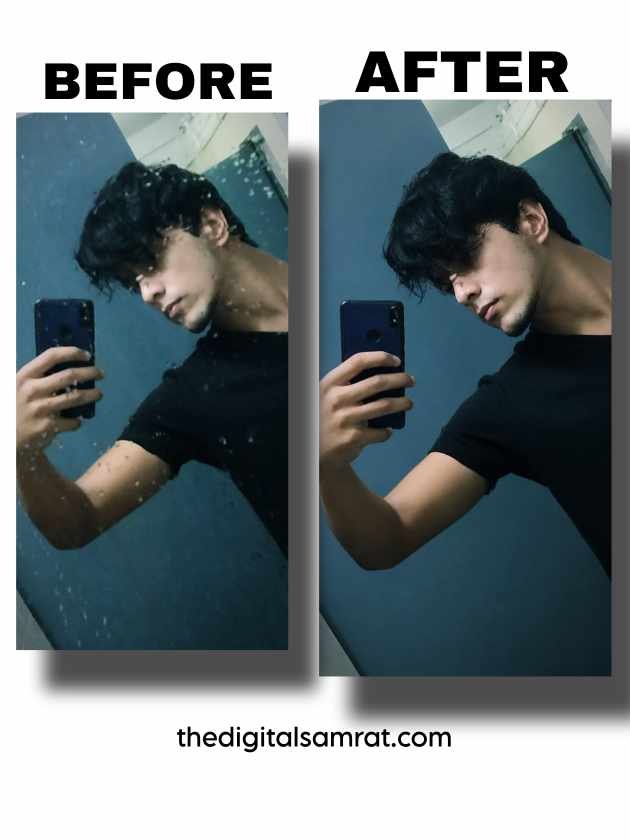
अगर आपने कोई Mirror Selfie ली है और Mirror Dirty होने की वजह से उसे Uplaod नहीं कर पा रहे हैं।
तो नीचे दिए prompt की मदद से आप Dirty Mirror को Clean कर सकते हैं।
Prompt – Look at this mirror selfie — the mirror is dirty and smudged. Please remove all the water spots, dust streaks, soap marks, and fingerprints from the mirror. Keep my face, outfit, and background exactly the same. Make the mirror look perfectly clean and crystal clear. Hyper-realistic result.
3. Fix Bad Lighting : Best ChatGPT Prompts for Photo Editing
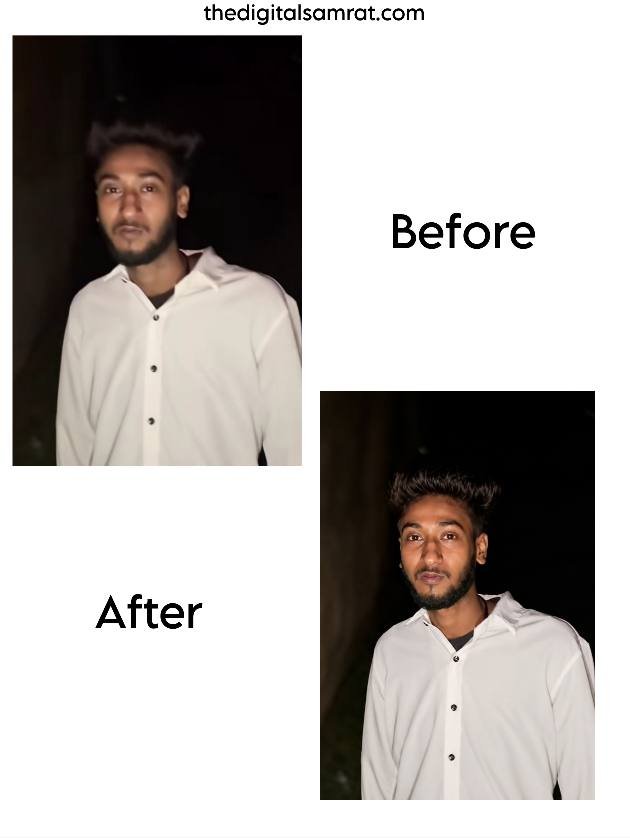
अगर आपकी Photo में Lighting अच्छी नहीं है, जिस वजह से Quality भी उतनी बढ़िया नहीं लग रही।
तो आप नीचे दिए Prompt की मदद से अपनी Photo की Lighting बढ़िया करके उसकी Quality बढ़ा सकते हो।
Prompt – Professional lighting correction and cinematic relighting based strictly on the provided image. Preserve the original subject’s identity, facial structure, pose, expression, clothing, framing, and background composition exactly. Correct poor exposure, recover shadow detail, improve contrast, balance highlights, and enhance lighting quality naturally. Add realistic premium portrait lighting with accurate skin tones, refined depth, natural contrast, and professional clarity while maintaining photorealism. Do not alter anatomy, hairstyle, proportions, or image structure. No stylization, no artificial beauty filter, no fake Al skin, no unrealistic glow. Output should look like the exact same photo captured with significantly better lighting and professional camera quality.
4. Generate 4 Different Poses From One Photo
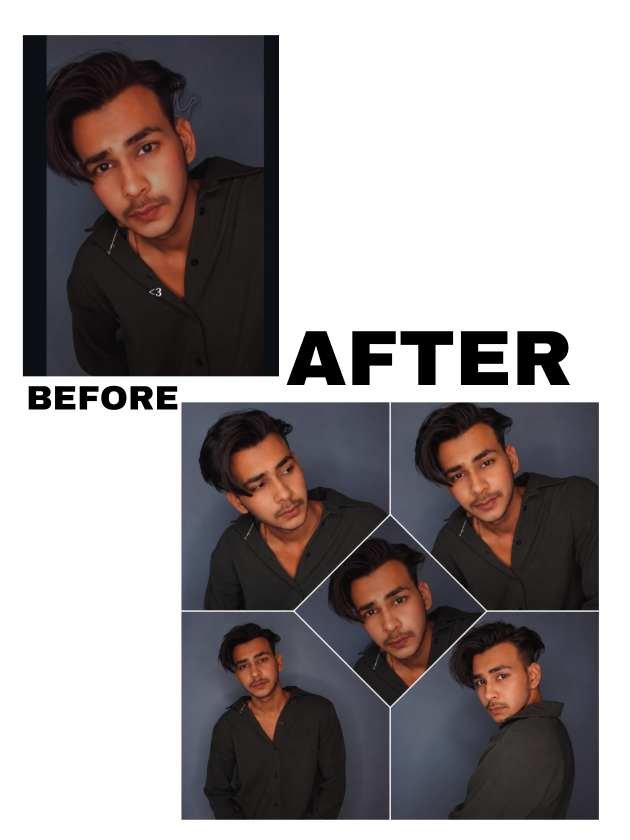
अगर आप अपने किसी पसंदीदा Photo में पहने Getup और Location के जैसा और भी Photo Generate करवाना चाहते हैं तो नीचे दिए prompt का use कर सकते हैं।
Prompt – Using the uploaded photo as the ONLY reference, create a premium 4-photo collage of the same person.
IMPORTANT RULES:
Keep the face, skin tone, hairstyle, body shape, age, and identity EXACTLY the same.
Keep the outfit, accessories, jewelry, makeup, and colors EXACTLY the same.
Keep the background/location EXACTLY the same.
Do not change clothing, do not add new accessories, do not modify facial features.
Maintain photorealistic consistency across all images.
Generate 4 different natural poses and camera angles:
1. Looking away candid pose.
2. Looking directly at the camera with a soft smile.
3. Half-body standing pose.
4. Over-the-shoulder pose looking back at the camera.
Style:
Ultra realistic photography.
Natural lighting.
High detail skin texture.
Professional Instagram photoshoot quality.
Consistent identity and outfit in every frame.
Create a clean modern collage layout with one image in the center and four around it.
No text, no watermark, no extra objects.
Best Free Ai Photo Editing Apps के बारे में जानने के लिए यहाँ क्लिक करें।
5. Ai Color Grading
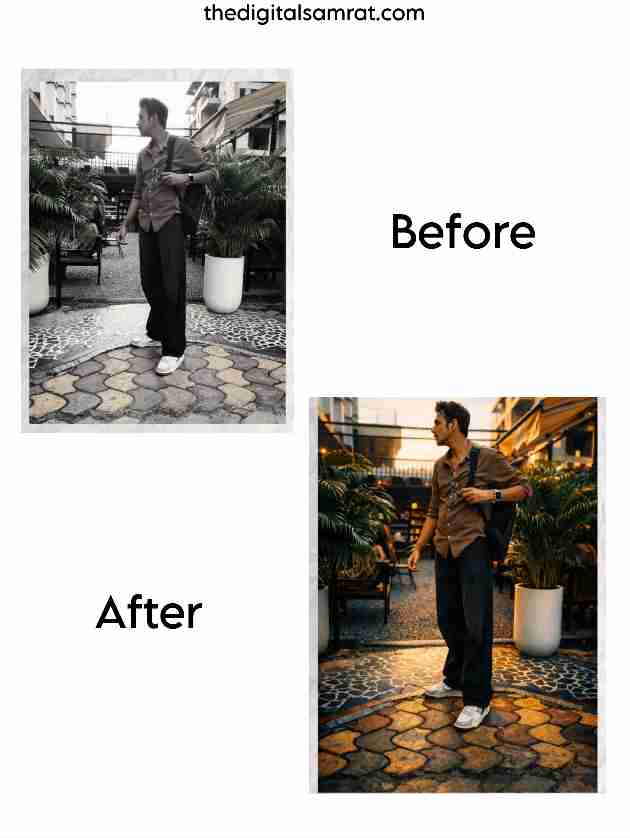
अगर आप बिना किसी मेहनत के Ai की मदद से अपनी Photos में Best Color Grading करना चाहते हैं।
तो नीचे दिए Prompt की मदद से कर सकते हैं।
Prompt – Carefully analyze the uploaded photo and understand its subject, environment, lighting, colors, and overall mood. Apply high-end, professional cinematic color grading in a refined Orange & Teal color tone, as if a top-level creator spent hours manually editing this image in Lightroom and Photoshop. Edit the image according to its natural category (portrait, people, nature, street, travel, animal, architecture, lifestyle, etc.) and enhance it in a visually pleasing, realistic, and premium way, while maintaining the Orange & Teal cinematic look.
EDITING STYLE & LOOK
* Clean, professional Orange & Teal cinematic color grading
* Warm, natural orange tones in highlights and warmer areas
* Cool, controlled teal tones in shadows and background
* Balanced contrast (not harsh, not flat)
* Soft highlights and deep but detailed shadows
* Proper dynamic range and tonal balance
* Subtle cinematic depth and subject separation
BACKGROUND BOKEH (IMPORTANT)
Add natural, realistic background bokeh where it makes sense
* Keep the main subject sharp and clear
* Background should softly blur to create depth
* Bokeh must look optical and natural, not artificial or fake
* Do not over-blur; keep it subtle and cinematic
COLOR GRADING PRINCIPLES
* Maintain realistic and natural overall colors
* Apply Orange & Teal tones tastefully, not overdone
* No oversaturation or extreme color shifts
* Clean whites and detailed blacks
* Color harmony should feel intentional and professional
LIGHTING & MOOD
* Respect the original lighting conditions
* Enhance existing light naturally
Do not introduce artificial or unrealistic lighting
* Create a cinematic, high-end mood while staying realistic
IMPORTANT RESTRICTIONS
* Do not change the structure, shape, or reality of the scene
* No artificial AI-art look, no illustration, no cartoon style
* No over-processing or excessive effects
* The image must look naturally color-graded and realistically edited, not digitally manipulated
FINAL RESULT
The photo should look like a professionally edited Orange & Teal cinematic image with subtle background bokeh,
crafted with expert taste — clean, natural, premium, and visually powerful, as if edited by a high-end filmmaker.
Important Notice
Do not explain the process.
Do not describe the edits.
Just apply the Orange & Teal color grading and background bokeh based on expert judgment.
Conclusion : Best ChatGPT Prompts For Photo Editing
Artificial Intelligence की मदद से Photo Editing के लिए हम नए-नए Best chatgpt prompts for photo editing, Update करते रहेंगे, हम आशा करते हैं कि यह Prompts आपके लिए useful सिद्ध हों।